
Table of Contents
Pollo Recast: New Characters, Same Moves — Reimagine Any Video
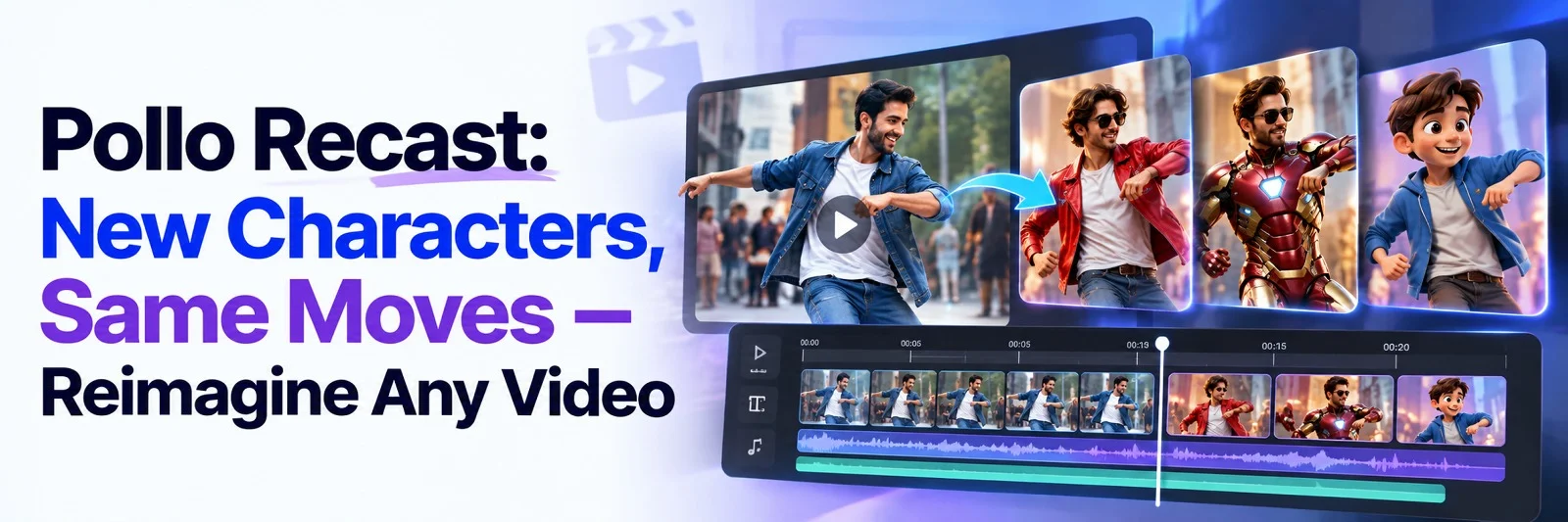
Recreating a compelling video usually means repeating the hardest work: planning the performance, blocking the camera, timing the cuts, and arranging the setting. That makes it expensive to produce fresh versions for a new character, product, market, or campaign. Pollo Recast takes a different route by treating an existing video as the motion and camera reference, then rebuilding the scene around replacement assets.
The result can preserve the recognizable action while changing who appears, what is being promoted, or where the story takes place. For creators and marketers, Pollo Recast offers a practical way to turn one strong take into multiple versions without starting the entire performance from scratch.
What Pollo Recast actually changes
Pollo Recast recreates a video around a character, product, prop, or setting supplied by the user. This makes it useful for UGC Video Ads, where a proven performance can be adapted around a new product, presenter, or brand character. The source clip contributes the movement, camera path, cuts, and timing, while the new reference assets determine what the recreated version is about.
The workflow is different from simply placing a face over a performer. A full character replacement asks the system to rebuild the subject throughout the performance, including body movement, clothing, and interaction with the environment. A product recast similarly aims to make the item part of the action rather than adding a flat image on top of an existing frame.
Keep the motion that made the clip work
The strongest reference videos have a clear action that can be recognized from beginning to end. A dance, hand gesture, product reveal, entrance, transition, or camera orbit can provide a useful performance pattern. When the movement is easy to follow, the recreated version has a better chance of keeping the same energy and timing.
Pollo Recast can follow the action, camera movement, cuts, and rhythm of the source. That makes it suitable for creators who want to reuse a successful format with their own cast. A mascot can perform a familiar dance, a virtual character can take over a trend, or a new presenter can deliver a visual gesture without a second live shoot.
Put your own character into the action
Character replacement works best when the reference image gives the model a clear view of the subject. Use a well-lit image with visible facial features, a coherent outfit, and a compatible pose. A turnaround can help when the subject rotates substantially.
For social creators, this can turn an original character, pet, mascot, or avatar into a recognizable trend format. The familiar action remains useful to viewers, while the new cast gives the post a distinct identity. The result still needs review because complex hand contact, heavy occlusion, or rapid motion can expose inconsistencies.
Make a product part of the moment
Product recasting is useful when a brand has a strong product image but lacks footage of the item in motion. A replacement asset can place the product into a reveal, unboxing gesture, lifestyle action, or cinematic camera move. The source video supplies the choreography, while the product image guides the new visual focus.
The goal is to show the item in a believable context, not merely insert a logo. Check product shape, packaging, label text, and reflections from the opening frame through the final cut. Add changing small lettering during finishing.
Turn one strong clip into a series
One approved reference can become the foundation for several creative variations. A brand might keep the same product reveal while changing the location, seasonal styling, or presenter. A regional marketing team can adapt one movement to local people and settings without filming the sequence again.
This approach helps campaigns create many versions from one proven action. Match the source lighting, framing, and motion so each replacement feels intentional.
Spend less time prompting every beat
Traditional text-to-video prompting asks the creator to describe nearly every action and camera change. Pollo Recast shifts that burden to the reference video, while a short direction identifies the new cast, setting, mood, or product role. State what changes, what remains recognizable, and how the new world should look, such as: “recreate this product reveal with the supplied blue bottle in a warm kitchen, keeping the original hand movement and camera timing.”
How it differs from related video tools
Pollo Recast is designed to recreate an entire source video around new assets. Mimic motion usually starts with one image and transfers a motion pattern to that subject. Video-to-video tools focus on changing the style or appearance of existing footage, while face-swap tools concentrate mainly on facial identity.
Choose a recast approach when the complete performance should remain recognizable; use a narrower tool when only movement or visual style needs to change.
What creators should check before publishing
Use only source videos, music, images, and characters that are owned or properly licensed. Review the entire result rather than judging the thumbnail, paying attention to hands, faces, contact points, logos, and background changes. A video that keeps the broad motion can still require refinement before it is used in a paid campaign.
Pollo AI can also support later polishing through an AI video editor or video enhancer, depending on the workflow.
Final verdict
Pollo Recast is most useful when the creative value already exists in a reference performance, but the cast or visual world needs to change. It preserves the movement and camera language that made the source compelling, then gives creators a practical way to introduce a new character, product, setting, or market variation. Try one clear reference and one well-prepared replacement asset first, then expand the concept into a repeatable series through Pollo AI.

 +91 774-202-1725
 +1 (945) 3387904
 business@coherentlab.com
 +49 15223341304
 UK
UK

